What Magister announced on November 25
On November 25, 2026, Magister Marketing announced an MCP connector intended to give AI assistants one entry point into its marketing workspace. MCP, or Model Context Protocol, is a way for a compatible assistant to discover and call tools supplied by a separate service. The important difference here is that Magister is offering the brand profile, audience, messaging rules, plan and prior work alongside tools for other services. The reported count of 85 integrations comes from the vendor; it is not an independent audit of feature coverage. Claude, ChatGPT, Codex and Cursor are among the clients named in the announcement. That describes the intended integration surface, not a promise that any account, role, subscription or client configuration will expose every action. November 25 announcement · Current MCP catalog
There is also a timeline distinction worth keeping. Magister's August 26 changelog already described a marketing MCP server for outside assistants. The November 25 release presents the current connector and its advertised breadth; it is not evidence that the underlying server first existed on that date. Magister’s November 10 changelog already lists Reddit Ads and ChatGPT Ads in the Magister product. That earlier entry describes the product’s ability to draft stopped campaigns, work with approval before spending, and report performance. The November 25 announcement is about the marketing MCP connector. The earlier product description does not establish what the later connector can do with any one account or network. Analyze separately what is in the Magister application, what is in the current callable MCP catalog, and what your account can actually see. November 10 changelog
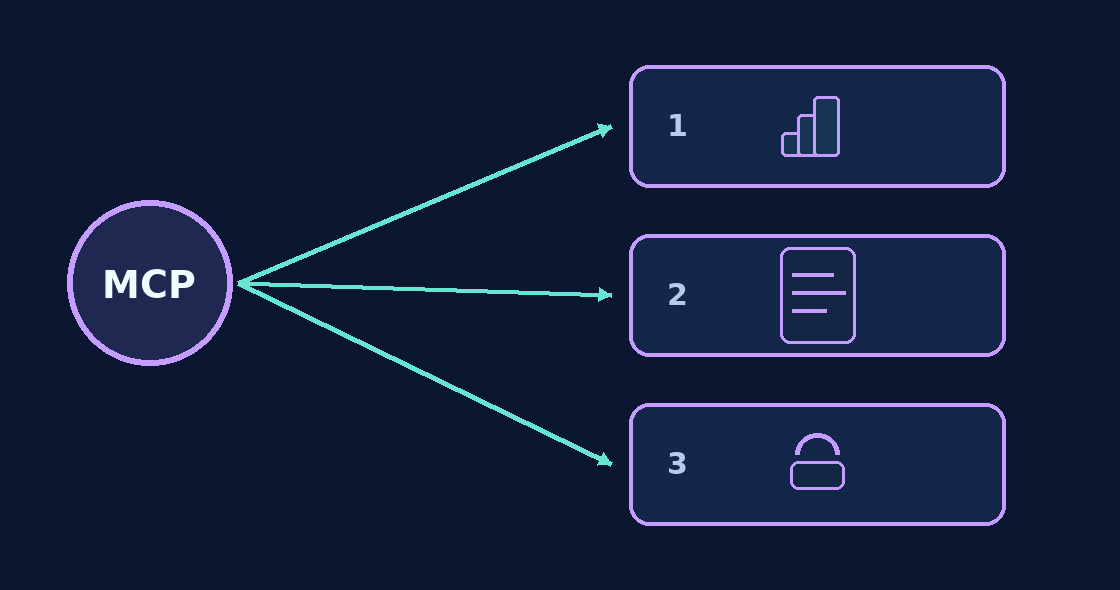
Original editorial diagram showing three categories of effects; it does not reproduce the Magister interface or imply each operation is enabled.
Primary source for this illustration
What the integration count hides
A broad catalog is useful when a team keeps analytics in one product, organic search in another, and creative drafts and the task calendar somewhere else. Someone asking, “Why did qualified traffic fall this week?” could give the assistant a consistent brand and business objective before it examines search and site data. The common interface can reduce repeated setup and the time it takes to locate approved sources. It does not make identifiers, attribution windows or reporting latency equivalent. Nor does it imply that native interface features such as segmented exports or custom attribution dimensions are available in exactly the same form.
Before comparing vendors, give each integration a job. For search analytics the job might be to return clicks for a specific property over a stored period, segmented by page, and to explain withheld or missing rows. For website analytics it might be to return totals for an agreed event with a named timezone, not to create new events. For a content system it might be to list drafts rather than update or publish them. This makes a single connector comparable with a direct export, a native integration, or a small scheduled report. The existence of a brand profile won’t correct a query against the wrong property, and a nice summary won’t make mismatched denominators comparable.
Three kinds of effects, not a binary read/write switch
Reading an approved report. Retrieving the campaign list, inspecting a stored brief or checking a credit balance brings information to the assistant. Even genuine reading moves information across a boundary. Decide which team members can identify other brands, which reports can enter a conversation, and how long their extracts and transcripts are retained. Verify whether a connector response contains only the aggregate asked for, or also returns raw rows, names, document links or credentials that were unnecessary for the task. A read never becomes harmless just because it does not update the source.
Changing the workspace or consuming credits. Magister’s published catalog places certain plan changes and brand-memory edits in baseline access. It also places some metered work within that access, such as keyword research, audits and AI-visibility work. A plan edit is a persistent change even if a social post never leaves the organization. An audit job can consume credits even if no campaign is published. Check what changes, who can see the new state, whether the edit can be reversed, and how jobs appear in the usage log. If the client cannot limit available calls by action, use a separate test organization and avoid connecting production resources. A prompt saying “only read” is not a security control on its own. Baseline scope and metered work
Changing an external account. According to Magister, publishing, sending and other external operations use separate scopes; designated actions can also require confirmation at execution. The paid-ad scope (`ads:write`) covers creating paused campaigns on Meta, TikTok and Google Ads Search and pausing eligible running campaigns. The published MCP catalog says it does not activate campaigns or start spending. Pausing is still a consequential write: it can stop delivery, disrupt a time-bound launch or create a reporting discontinuity. Likewise, creating a paused campaign changes account inventory even though it does not immediately spend. Do not infer new capabilities from an app-screen feature, a marketing headline or a broad consent label. Opt-in tool catalog
A hypothetical pilot that can fail usefully
Imagine a small agency testing analytics for an isolated retail demo brand. The team does not connect advertising accounts, email, social publishing, patient data, or an account that can administer other brands. A marketing analyst owns the metric definitions, a workspace administrator verifies scope and revocation, and a reviewer opens the native source exports without looking at the assistant’s interpretation first. The intent is not to prove whether a product is generally safe. It is to decide whether one well-defined reporting task can be performed more reliably or quickly under this setup.
Start with a closed, explicitly named seven-day window and record the property, timezone, filters and export time. Ask three questions: how many search clicks did the property show, how many site sessions matched the agreed reporting definition, and which landing pages accounted for most of those sessions? Include a fourth test in which a metric or date is deliberately unavailable and verify that the result says so. For each successful response require a source reference, measurement scope and definition. Do not ask it to unify people or assign a result to a channel if the data does not support that inference. Record only the fields needed to reproduce the report.
Suppose the native Search Console export shows 400 clicks, while the connector reports 380 for what it labels the same scope. The gap is 20 clicks, or 5% of the native export. The first task is to identify a mismatch, not to choose one number or smooth the chart. Check whether the connector returned only rows from the first page, used another time zone or search type, excluded certain URLs, or compared query-level aggregates with a property total. If the gap cannot be traced, label that metric unverified. Search clicks and website sessions can differ even in correct reports; comparing those two distinct measures would not test parity.
Define pass, fail and cost before you connect
In this example, the owner might require that all totals match the fixed native export on identical filters or have a reviewed explanation; every result must state account, date and source; missing values must never become zero; and logs must show no changes or billed jobs. Advantage is a second question. Compare median staff minutes across six matched reports, counting setup time, reviewer time and rework. If the tool makes drafts faster but pushes the same amount of work into checking, it has shifted effort rather than saved it. Record both the number of mismatches and the number of reports affected, rather than hiding unreliable fields inside an average accuracy score.
Version the definition sheet and repeat the same report if a metric, integration scope or provider plan changes. Keep the native export as the comparison record. Require an audit record for any attempted write, even if rejected. Check that disconnecting prevents further access from the test client and that the administrator understands which copy of previously retrieved material may still remain. Revocation stops future authorized tool calls under that connection; it should not be assumed to erase cached exports, conversations or data retained elsewhere. Verify deletion and retention separately with the vendor and the client where relevant.
One useful rollback test is to end the connection, close the original conversation and start a fresh one using the same test identity. The previously permitted report should no longer be retrievable through that connection. Record the expected and observed behavior without trying any alternate account or expanding the grant. If the test fails, leave the pilot isolated and clarify which component still has access before moving any real work into it.
Where the stakes are higher
An agency may be able to test a public-web brand with limited data and short retention. Healthcare is different. Patient information, appointment details, contact information and diagnosis-linked audiences should not be pulled into a new marketing connector just to try a feature. A safer evaluation uses public information or fabricated test records with no path back to a real person. Do not assume aggregate marketing counts validate an individual’s appointment or that this connector is available or approved for any named hospital. The real booking or attendance event should be verified in the organization’s approved scheduling system, not inferred from website activity or an assistant’s summary.
If the pilot succeeds, the next scope should have a named operation and a named owner. For instance, the owner might permit reviewing draft content in a sandbox CMS, without giving publishing rights. Before a later external change, the approval should state destination, affected account, exact change and expected consequence. Confirming “make the campaign better” is not meaningful authorization to pause it. After any authorized external action, read back the final state from the designated system before declaring success or repeating a call. The goal is to preserve the distinctions that are often lost in a busy interface: proposed, approved, sent and verified are not the same state.
The practical conclusion
Magister’s announcement is an example of consolidation: one assistant can get closer to the context and tools a marketing team uses every day. That is the attraction and the reason for caution. Compare it against the smaller workflow that already does the job before adding more connected accounts. The defensible first expansion is not the integration with the flashiest demo; it is the smallest, most useful action whose data, permissions, cost and result a reviewer can independently verify.
Comments
No published comments yet.