
The November signal is renewed attention, not a new launch
CLI-Anything appeared on GitHub’s daily Trending list in the snapshot reviewed for November 25, 2026. It was the third listing in that snapshot, and GitHub showed 1,074 stars for the day. The list changes, and a star is not an installation, a successful job, or a vote for a particular feature. The project’s v0.4.0 release is dated June 25, 2026. The news is that an existing project found fresh attention, not that it shipped a new version this week. That distinction is worth making before a team invests time in a tool its members have only seen on a trending page.
The renewed interest points to a practical question for marketers and creative teams. Many of their daily chores still depend on an application being open, a teammate knowing which buttons to click, and everyone remembering the same naming convention. A scriptable interface can make certain steps easier to specify and repeat. That does not make the work autonomous end to end. The goal is to spot one low-risk task that becomes more reliable with a recorded input and a verifiable output, not to hand an agent the keys to the department.
What the project does and where it stops
The HKUDS repository describes an approach for building command-line interfaces for software that may usually be operated through a graphical interface. A generated adapter translates a limited set of explicit commands into actions supported by the application. Depending on the adapter, the source describes features such as structured JSON output, persistent state, documentation and tests. The CLI-Hub catalog helps users discover adapters. Examples in the project span creative, office and analytics software. This is a catalog of capabilities, not a warranty that all features of each application are covered or that every setup will work on your computer.
The difference between a screen and a command is easiest to see in an export. On a screen an operator recognises a dialog and decides which options need touching. A command expresses the intended size, output format and destination explicitly. If the adapter supports all three, a reviewer can compare the request against the resulting file and see what actually happened. If the adapter ignores an option, generates a different crop, or requires an application version the team does not use, the explicit request is an advantage only if the failure is detected and handled.
Open-source availability is not the same as support or compatibility. The adapter may need the underlying program installed, a compatible version of it and additional dependencies. A template that works on one machine may have fonts missing on another. A job may produce a correct-looking file whose dimensions, transparency or colour profile are wrong. The repository’s own documentation also treats its Codex path as experimental and community maintained; do not assume it is an official product integration. Audit the exact adapter, version and supported actions for the job you want, and do not infer resilience from stars or from a good-looking demo.
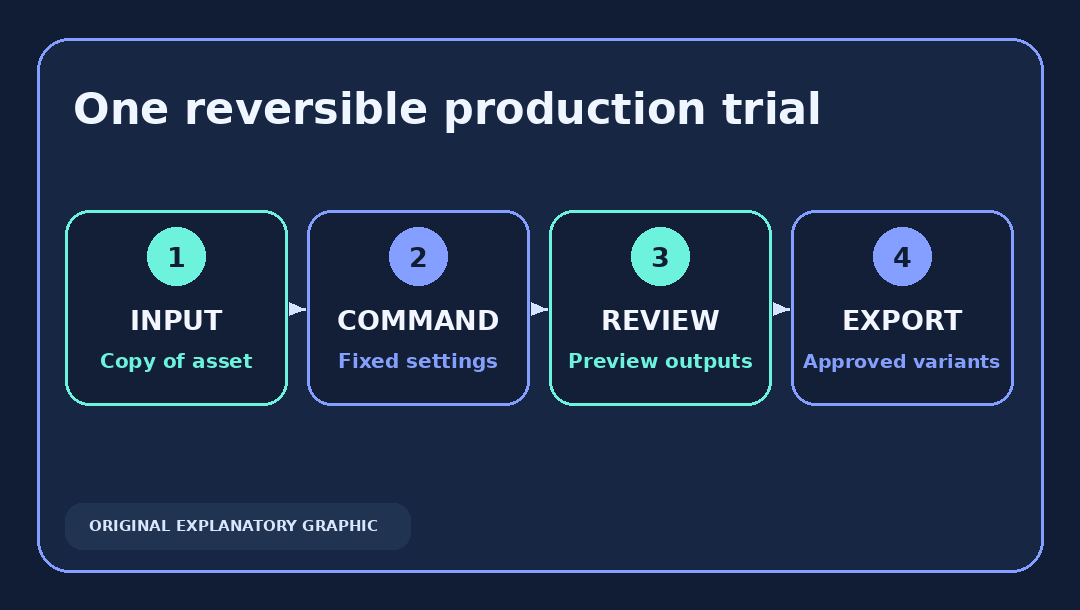
Illustrative workflow: work on copies, inspect the result, and let a person approve what leaves the test folder.
Start with one deliverable that can be checked
Consider an imaginary retail team adapting a cleared image for a campaign. The designer has already chosen the artwork and approved three rectangles for use in different channels. The repetitive job is to export those versions from a copy of the source file, use the existing naming convention and place only the exports in a review folder. This test does not include writing the headline, inventing an offer, changing paid-media settings or posting to any account. Copying only the necessary input and using drafts makes mistakes cheaper and easier to spot.
Write a short job record that both the designer and the operator can understand. State the source version, each output size, file type, expected file name and where the file should appear. Define the crop anchor using the team’s existing creative directions, and explicitly prohibit overwriting or moving the original. If the tool does not expose cropping for the chosen application, do not silently switch to a scale-only operation. Go back to the manual procedure or choose another fully supported task. The list of exact expected outputs is also the easiest acceptance test.
Give the process a folder containing only synthetic or already cleared assets. Keep it separate from shared creative drives, analytics exports, customer information and credentials. Have an operator start the job, inspect the generated files at their intended dimensions and compare them with manually prepared examples. A correctly named file might still crop a logo or show a halo around a transparent object. Review edge cases on a phone-sized preview where appropriate. Check the file metadata separately: a polished thumbnail proves little if a channel rejects the image’s format or dimensions.
Compare the new process with the manual one
An experiment needs a baseline that includes the work people usually forget to count. Time the manual version from unpacking the assets to delivering the checked folder. Then time the adapter-assisted version through the same checkpoints. Count setup, maintenance and review separately from execution. Track the share of first-pass batches accepted, the number of manual corrections, the elapsed time to an approved batch and the kinds of defects each path misses. A five-minute export with ten minutes of fixing is slower than a twelve-minute manual run, even before the team maintains the adapter.
A small pilot should include routine cases and some known awkward ones: a long file name, an image with transparency, an unavailable font, or an unexpected extension. Run the same task again on the same input. The output should stay stable or any intentional variation should be recorded. Ask another operator to run the instructions; a workflow that only works for its author has moved expertise rather than removed fragility. If the test finds an inconsistent size or crop, record the failed case before trying a fix and use it as a regression example later.
Use a clear fallback and decide when to stop. If two batches in a row need urgent manual repair, there should be a simple route back to the old process; nobody should be forced to debug an adapter five minutes before a deadline. If the process catches mistakes and cuts review time reliably, extend it to a second job with its own acceptance rules. Do not extend it to transfers, deletions or publication merely because it generated exports correctly. The cost of an error changes once the output leaves the review folder.
Design the handoff, not just the command
It helps to record work at three points: what was requested, what the tool reported, and what the reviewer approved. Save those separately. A successful command may mean a process exited cleanly, not that all the specified files reached the right place or meet the brand brief. A human check should confirm count, formats and visible quality before any release. If a file is rejected, capture the reason in plain language so the next operator can distinguish a formatting defect from a change in the campaign’s creative direction. That distinction prevents irrelevant automation fixes.
For reporting teams the same pattern could apply to converting a copy of a finished document to PDF, but only if page breaks, tables, links, fonts and accessibility are checked against a baseline. A PDF with the right number of pages can still truncate a chart or conceal an explanatory footnote. A second possible workflow is to produce validated filenames and a manifest for assets while leaving actual edits manual. Teams without a reliable manual checklist often gain more by writing that checklist first than by introducing another tool. A clean record is valuable with or without a command-line adapter.
This is why the trend matters beyond developers: a good interface can narrow the space between an instruction and work a teammate can verify. But repeatability is only useful over work the team has agreed how to check. Treat CLI-Anything as an invitation to improve one repeatable handoff. If the pilot works, keep the best checks and document the limits. If it fails, keep the evidence and the manual route. Either outcome is more useful than assuming software is ready for unsupervised use because it is popular.
A framework for deciding whether the pilot should continue
Make a one-page decision sheet before running the pilot. Put the manual operation on the left and the adapter-assisted operation on the right. In each column record time for intake, execution and review; note each defect and whether a person or a validation rule caught it. The reviewer can evaluate the two folders against the same rules without being told how a particular batch was produced. With a small batch that is usually a more useful comparison than a complex dashboard. It also reduces the temptation to give the new tool credit for faults the designer fixed before the stopwatch started.
Use a clearly labelled hypothetical acceptance rule if the team has no baseline yet. For example, a first pass counts as accepted only when every specified file is present, the names and dimensions are correct, and the reviewer sees no new visual defect at phone size. Exclude nothing merely because it is inconvenient to classify: a thumbnail in the wrong destination is a failed batch even when the pixels are perfect. An otherwise attractive result can remain a draft; the quality gate should not turn into pressure to release something because it was expensive to generate.
Separate everyday batches from deliberate stress cases and note whether the brief changed while you were measuring. A job involving three almost identical versions is not comparable to one in which each crop needed manual attention. With very few observations, show the individual cases rather than a mean that suggests precision the test cannot support. Rank defects by impact: a filename typo is easy to repair, but cropping out a required disclaimer may make an otherwise excellent file unusable. The point is not to produce a long report. It is to avoid choosing a daily workflow based on a deceptively easy test.
Once the pilot has run, compare the work saved with the work added. If the method reduces repeated clicks but adds a new dependency known only to one person, fix the training and rollback first. If the relevant features or file types are not covered, the result may be that this is simply the wrong adapter for the job. Good automation decisions include declining an implementation and preserving a smaller improvement, such as validated naming or more explicit review notes, that helps either workflow.
Comments
No published comments yet.