Reviewed November 1, 2026. Canva’s newsroom index dates the Brush announcement October 29.
What Canva announced—and what the numbers mean
Canva says Brush powers supported design edits in Canva AI for Pro subscribers and preserves editable elements. Brand Kit support is planned, not announced as available. Its reported improvements—up to 69% faster editing and 46% lower cost per edit—compare with its previous design agent; they are not subscription discounts or promises for your workflow. Canva announcement.
The analysis below proposes a design-team evaluation, not an independent benchmark of Brush. Its central question is deliberately narrower than whether artificial intelligence can design: can an assisted edit reduce the total work required to deliver an approved, maintainable asset? That question includes preparation, correction, review and handover. A fast first response is useful only when the rest of the production chain benefits. No performance outcome is claimed here for a Saudi or international team; the examples describe tests a team could choose to conduct.
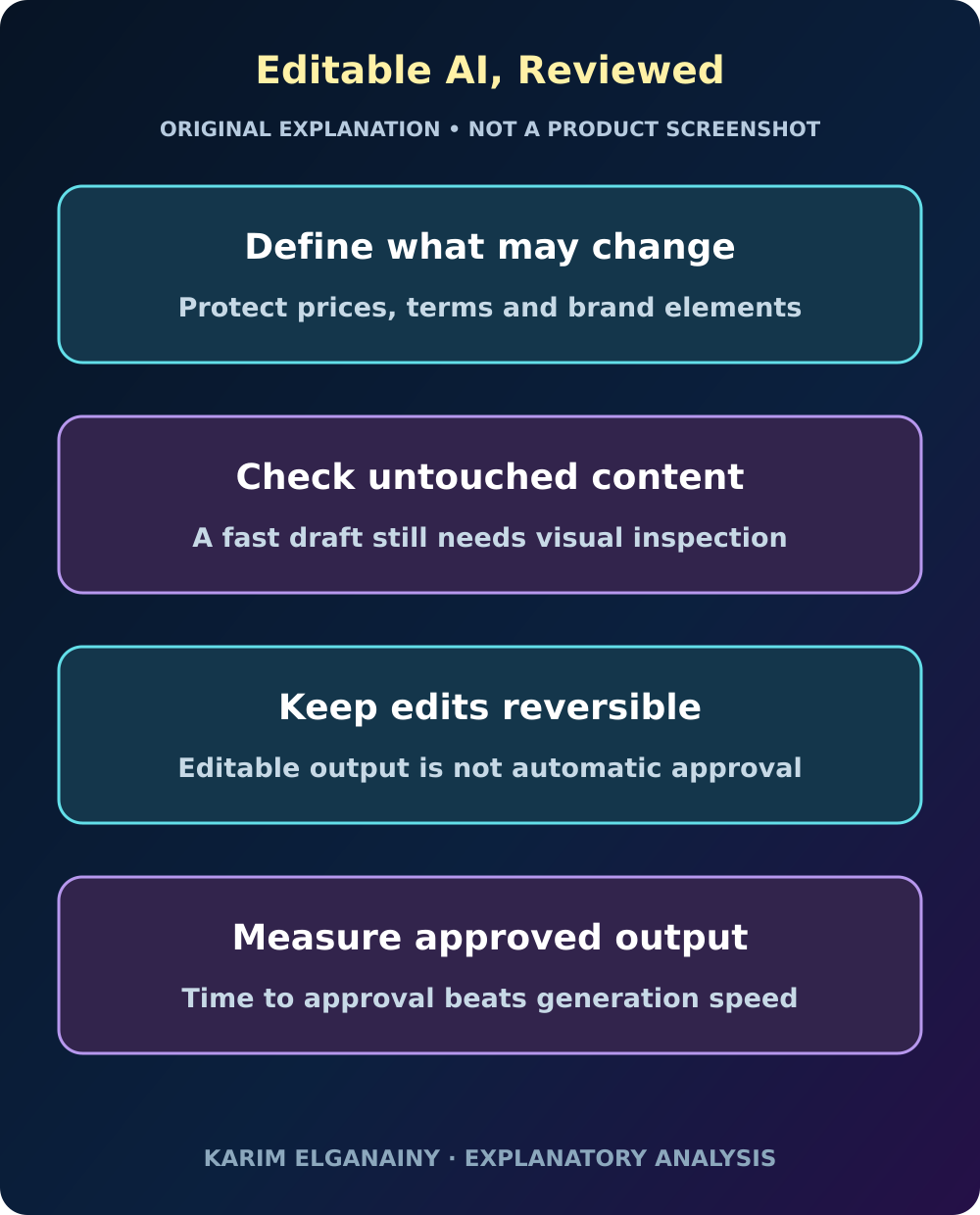
Original editorial framework; not a product screenshot or proof of campaign results.
Treat an edit as a contract with two sides
A useful editing brief states both the desired change and the protected content. Consider a hypothetical recruitment poster that needs a new date. The positive instruction is easy: replace the date. The equally important instruction is to preserve the location, eligibility conditions, contact details and visual hierarchy. Without the second half, a visually attractive result can quietly create extra checking work. The goal is not to write an elaborate prompt for its own sake, but to define what would count as successful completion before seeing the result.
Build a small change contract with three fields: modify, preserve and inspect. “Modify” contains the requested intervention. “Preserve” lists elements whose meaning or position matters. “Inspect” identifies relationships that might be disturbed, such as text wrapping beside a logo. Use ordinary language a colleague could follow manually. If the instruction cannot be understood without access to the author’s memory, it is not yet a useful specification for either a person or a model. Clarifying it improves the existing process even if no AI tool is adopted.
Choose a task ladder, not a spectacular demonstration
A demonstration usually favors a visually noticeable transformation. A production evaluation should include the edits that consume ordinary working days. Start with a single text replacement, then a coordinated color change, then a layout adaptation with protected content. Add multi-page consistency only after the simpler tasks can be evaluated reliably. These are proposed categories rather than claims about guaranteed product support. Check actual account access and supported behavior before including a task in the trial.
Select examples with known answers and retain untouched copies. Include a crowded but realistic page, not only a clean sample chosen because it is easy. A useful test set contains both changes the team expects to automate and changes it expects to keep manual. The second category prevents a misleading evaluation in which every task must become an automation success. Record why each example was selected. A result on one convenient poster should not quietly become a conclusion about presentations, social assets and every other production format.
Measure approved completion rather than response time
Split elapsed work into preparation, tool interaction, correction, inspection and delivery. Keep active human time separate from unattended waiting where that distinction matters to staffing. A short generation time and a short production time are not interchangeable. For example, a result that arrives quickly but needs detailed comparison against the original may create less value than a slower result that is straightforward to inspect. This is a measurement proposal, not a claim about Brush’s observed behavior.
Use the same completion definition for the assisted and existing methods. If the manual version receives a full quality review while the assisted version is counted at first output, the comparison favors the latter by construction. Include failed attempts and reversions in the record. Report the range of outcomes, especially the cases requiring substantial recovery, instead of only the best example. A design manager needs to know where work becomes predictable, not merely where a single attempt can look impressively fast.
Make preservation visible in the review
Place the original and revised assets side by side and inspect protected content first. Then review the requested change. This order helps avoid a common distraction: a strong new visual direction can attract attention away from a small factual change elsewhere. For a price card, check the amount, unit, qualification and validity period before discussing aesthetic preference. For an event slide, check the date, venue and registration destination. Use fictional or approved non-sensitive material for the initial evaluation.
Record unintended differences as specific observations, not a vague quality score. “The address moved below the visible crop” is more actionable than “layout quality declined.” Distinguish a factual error, a broken relationship, an aesthetic disagreement and an unsupported instruction. Their remedies differ. A clearer prompt may help with an ambiguous request, while a repeated unwanted change may justify keeping that task manual. The review should produce a decision about a task type, not a contest between enthusiasm for automation and attachment to an existing method.
Test whether editability survives the next handover
An editable asset is valuable when another person can understand and continue it. Make handover part of the evaluation: ask a colleague to perform one small follow-on change without the original operator explaining the file. Check whether the relevant text can be found, whether objects behave as expected and whether the visual relationships remain manageable. This is an internal acceptance test, not a report of defects in any product. It examines the practical value of a property that otherwise sounds complete in a headline.
The next edit may be more revealing than the first. A campaign asset often changes after review because a product becomes unavailable, a speaker is replaced or a translation grows longer. Retain a known-good version and define a clear naming convention for approved outputs. Do not let a visually successful experiment overwrite the only production copy. Recoverability is part of efficiency: a workflow that occasionally requires rebuilding an asset from scratch can consume the time saved during many routine adjustments.
Give Arabic typography its own acceptance criteria
A bilingual team should not judge an Arabic layout only by whether translated words appear. Inspect reading order, alignment, line breaks, numeral treatment and the interaction between Arabic and Latin names. Review the text at the actual output size. A sentence that fits comfortably on a desktop preview may become difficult to read on a small mobile asset. These are proposed visual checks, not a claim that the announced system passes or fails them.
Use a reviewer who understands the intended audience and the meaning of the copy. A line break can separate a qualification from the statement it limits, even when every word is present. A larger heading may push the important action out of the crop. Compare equivalent communication goals across languages rather than forcing identical line counts. If the Arabic version needs a different composition to remain clear, record that as a design requirement instead of treating it as a translation inconvenience to be compressed away.
Separate visual consistency from brand approval
A coordinated palette is not the same as permission to change a brand asset. Establish a manual reference for the trial: approved logo treatment, type choices, color values and examples of unacceptable modifications. Keep the reference small enough that reviewers actually use it. Do not build a production dependency on a feature mentioned as future work. The team can evaluate limited tasks against its own references while leaving broader brand automation outside the pilot’s scope.
For each proposed restyling task, decide which attributes are flexible. A seasonal background may be negotiable while a product identifier is not. A decorative accent can change without authorizing the creation of a new logo variation. This distinction makes feedback more precise and avoids sending the model contradictory requests to be both radically different and exactly the same. It also helps a human designer assess whether the brief itself contains a conflict that must be resolved before any tool is used.
Translate efficiency into an actual operating decision
Do not convert a supplier’s efficiency percentage directly into a staffing plan or a client discount. Your own unit of work may include research, approvals, rights checks and stakeholder coordination that an editing benchmark does not cover. Define the business decision first: reducing a backlog, enabling more approved variations or shortening a particular revision cycle. Then choose evidence relevant to that decision. A faster isolated operation does not establish the size of the overall benefit.
Keep a simple cost model with the team’s actual categories and no invented savings. Include setup effort, review time and any verified account costs that differ between options. Where a figure is unknown, leave it unknown rather than inserting the announcement’s percentage. If the evaluation shows spare capacity, specify how it would be used. More variations are not automatically better; they need a purpose, a review capacity and a distribution plan. Otherwise faster production merely moves the bottleneck to someone else’s desk.
Finish the pilot with a task-specific answer
A useful pilot ends with a small routing guide. One class of edits may be suitable for assisted drafting with routine review. Another may need a designer present throughout. A third may remain manual because recovery or inspection is too costly. State the evidence and the limits behind each classification. Avoid a single verdict that the tool is either a replacement for design work or irrelevant to it. Production systems usually benefit from more specific decisions.
Keep one example of a successful edit, one difficult case and one reversal, with confidential material removed or access restricted as appropriate. These examples make training concrete without pretending to represent every future task. Revisit the routing guide when the product or the team’s work changes. The practical opportunity in AI-assisted editing is not simply to issue instructions faster. It is to make a defined class of changes easier to complete, inspect and hand over while preserving the decisions that matter. That is a result worth testing rather than assuming.
Comments
No published comments yet.