
What the announcement establishes
In its November 18 launch announcement, Cognizant introduced Patient Hub Operations and described a vendor target of bringing the time from prescription to therapy from about 30 days to under 7. Its product page, footnote 2, also estimates an overall work-effort reduction of up to 45%. Neither figure establishes an implementation timetable, a reduction in staffing, a patient outcome or availability in Saudi Arabia.
Both figures belong to the vendor’s analysis, not an independently measured result for a particular programme. The business question is narrower than whether a hub sounds faster: can a team remove avoidable administrative waiting without losing responsibility for the decisions that require a specialist? This article proposes an original way to check that question. Its examples are fictional, use no patient information and are not advice on therapy, eligibility or treatment.
Separate waiting from work
A case can spend much of its time waiting for an administrative handoff even when the work at each desk is brief. Draw the actual path from intake through the permitted stages rather than relying on the tidy sequence on a slide. For each step, note what must already be present, who accepts the task, whether someone can act while another task remains open and what route exists if ordinary processing cannot continue. Use those differences to identify queues; do not describe every interval as preventable delay.
In the fictional hub used here, a completeness check on a fictional training record and preparation of a document checklist can begin independently. Neither releases a final decision. If the intake is missing a prerequisite, the checklist can still be prepared, but the status must state that preparation is all that has happened. Someone must own the unresolved item, and the record cannot advance as if it were present. This is where parallel work helps: it removes avoidable waiting between eligible steps without pretending a required dependency has gone away.
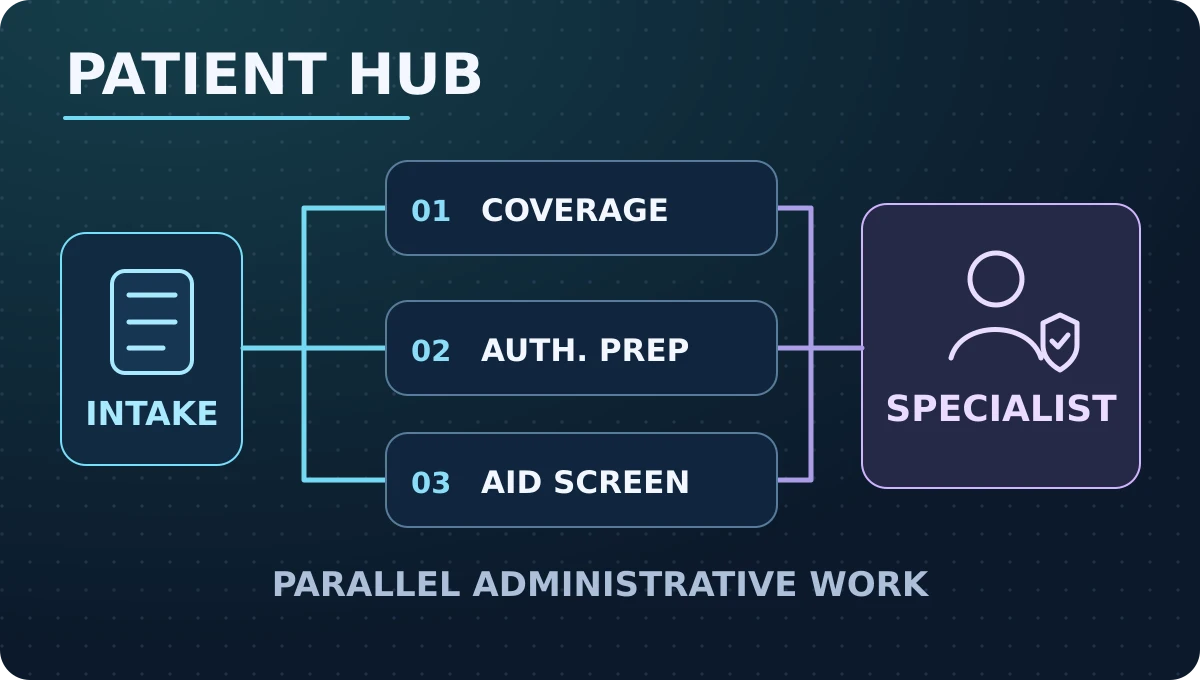
Original illustration created for Karim Elganainy’s website, based on Cognizant’s product description. This is a simplified administrative workflow, not the software or a clinical pathway.
Give each handoff an owner
A healthy handoff has a sending role, a receiving role and an observable event showing the receiver accepted the work. A task marked forwarded is not necessarily a task someone is working on. Define the state transition in ordinary language and put the receiving role on the record. If the role is unavailable, route the case to an assigned alternative or place it in a visible exception queue. Avoid a shared inbox whose members all assume someone else is responsible.
Test the handoff using a training record in which the first reviewer goes off duty while an item remains open. The next reviewer should be able to determine what was prepared, what has not been checked and what decision they are permitted to make. Do not force them to infer these distinctions from a long generated note. A concise status, a named owning role and a clear route to the underlying authorized record are more useful than an elaborate summary whose wording suggests certainty where none exists.
Preserve specialist authority at the release point
Keep a firm boundary between assembling information and making a determination. An administrative workflow can check for the presence of a required document or group authorized files for review. It should not infer from missing material that someone is ineligible, change a specialist decision, or claim that therapy has started because someone completed a queue item. Where a decision requires a qualified or authorized person, the system should present the relevant evidence and allow that person to review, defer, correct or escalate it.
Record the state before and after the specialist’s action and whom the action belongs to. If review is interrupted, preserve the last verified state, not the state that an automated process hoped to reach. In a training exercise, create a case marked ready for specialist review without a corresponding approval. Ask a reviewer to verify that no patient-facing completion notice would be triggered. The distinction protects both the accuracy of the records and the person at the end of the workflow from being told that something is settled when it is not.
Use consistent clocks and denominators
Define the timestamp that starts each interval and the verified event that ends it. Intake-to-completeness can be an operational measure; prescription-to-therapy is a broader measure, and a hub must not substitute the first for the second. A team that cannot confirm the end event should report that limitation rather than filling it with an administrative proxy. Define how transfers, withdrawals, records lacking dates and cases still open at review are reported. Treat missing timing data as a data-quality issue, not a case that quietly disappears.
A practical dashboard should distinguish case count, elapsed time and active handling effort. The first displays the workload, the second includes waiting, and the third tracks staff work in scope. A reduction in one does not guarantee a reduction in the others. Report routine and exception cases separately where sample sizes permit, including slow cases that deserve attention even when the typical duration improves. A shorter overall interval is more informative when the same calculation works for both the baseline and new workflow.
Pressure-test an unfinished administrative case
Imagine a fictional training record enters the hub with a valid reference but an incomplete administrative document. While a staff member prepares the checklist, a second team can confirm which documents are expected in that programme. Neither should submit the record as complete. If a duplicate arrives through another intake path, link it for an authorized reviewer to reconcile. Do not delete an apparent duplicate or overwrite the newer entry merely because the two records resemble each other.
Now suppose an external response has not yet arrived when the team runs a progress report. Show this case in the relevant open state; do not stop the clock at the last internal step and present the case as finished. Have the operations lead compare case history with the reporting view to verify the timing. This one exercise checks three potential failures: an administrative step mistaken for approval, duplicate work mistaken for additional volume, and a shorter reported duration produced by a changed definition rather than a better process.
Run a limited comparison before scaling
Set the evaluation question before implementation. A team might ask whether independently preparable tasks can be started earlier without an increase in incomplete handoffs or cases sent back by reviewers. Compare similar eligible groups or periods, and document differences in staffing, programme rules, demand patterns and intake sources. If those differences cannot be separated, explain that the comparison is descriptive. A successful prototype on training records does not show that the same process will work under live load.
Specify conditions for pausing the pilot before collecting results. Reasons might include repeated undocumented overrides, wrongly released status notices, or new delays for exception cases. The threshold for stopping should not be invented after seeing a promising headline. Assign someone to investigate adverse signals and someone to authorize restarting. Ask them to preserve the same definitions and observation windows so the decision is based on an actual change, not on which cases the team counted.
Calculate the work that moves elsewhere
Consider preparation, reviewer corrections, duplicate reconciliation, and support for confusing status messages. If one queue gets faster by shifting correction work into another team, the dashboard needs to make that shift visible. Compare the amount of handling time required for an eligible, completed unit of work, and separately track the number of cases that still need intervention. Include the operating effort required to govern rules and review failures where it belongs in the evaluation.
A vendor estimate about work effort should not become a direct workforce forecast. Work might change from collecting basic information to resolving exceptions, and the safety or service value of that redeployment needs its own evidence. Ask whether freed time is measurable, whether it has an agreed use and whether capacity is available where the work has moved. Report what the pilot actually supports instead of multiplying one percentage across the entire organization.
Define the next decision and protect the record
Keep the evaluation record narrow. Use synthetic examples for rehearsal and authorized operational aggregates for any real comparison. Record workflow versions, boundaries, definitions, observed exceptions and which role can approve a change. Do not copy personal identifiers or case narratives into a learning report simply because they appear in an operational system. Keep access and retention aligned to the team’s approved purpose, and ensure the test can be stopped without losing pending administrative work.
At review, choose whether to proceed, revise the design, or stop. Proceed only when the baseline comparison is interpretable, specialist authority stayed intact and the team can point to the specific waiting removed. Revise when signals are ambiguous or follow-up merely moved to another queue. Stop when the workflow cannot keep evidence, ownership and escalation intact. In all three cases, the useful output is a defensible operational decision, not a forecast of clinical outcomes or a claim that a vendor target will be achieved.
A handover memo makes the decision reproducible. Name the programme boundaries and the owner of the last verified state, and show which parts of the experiment could be repeated in a different setting. If an assumption about permissions, the response pathway or programme rules changes, reopen the evaluation instead of silently reusing the earlier conclusion. A second reviewer should be able to explain the recorded decision from the notes without seeing any personal case content.
Comments
No published comments yet.