
A good first question for an AI assistant is not “Can you optimize my account?” It is “Can you reproduce last week’s campaign spend, then show which campaigns contributed to attended appointments?” The first part tests the connection. The second tests whether your measurement definitions mean what you think they mean.
Documentation checked: 22 November 2026. Access depends on the platform, account permissions, client, and rollout. Check the linked setup docs before connecting a real account.
1. Know what you are connecting
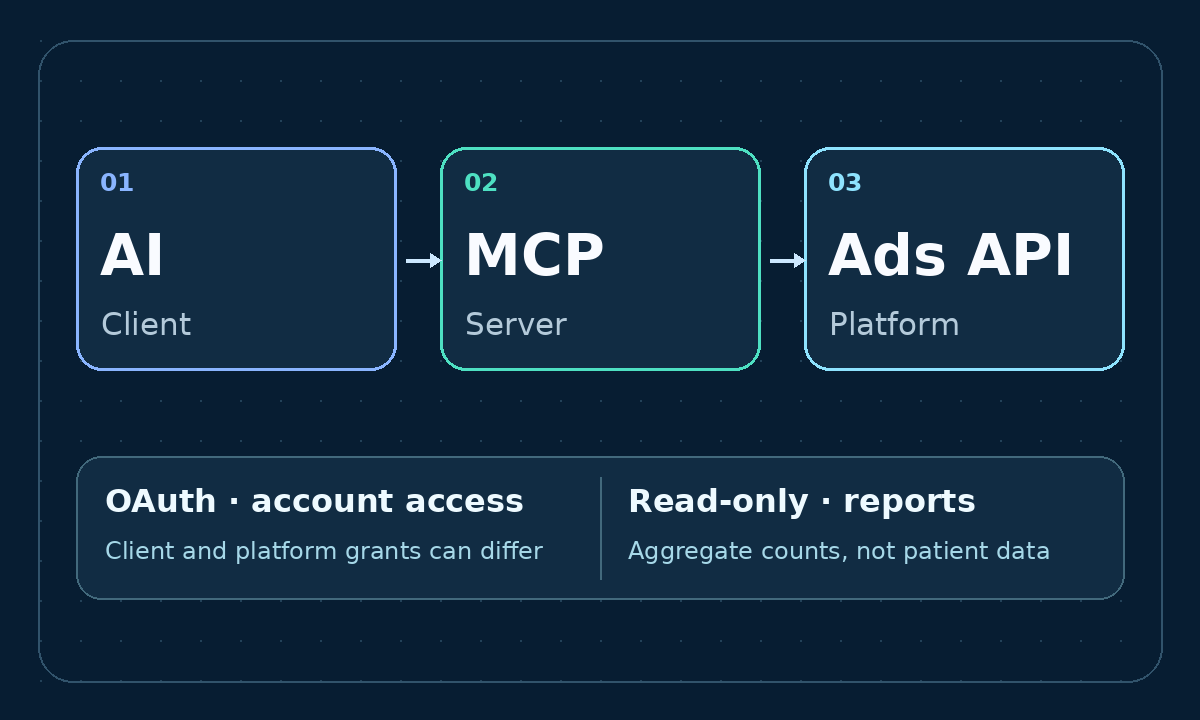
Original architecture diagram. Client and platform grants can differ. Return aggregate reporting data, not individual patient records.
An Ads API exposes platform data and actions. An MCP server offers a catalog of tools, such as reading campaign performance, that a compatible AI client can discover and call. A media buyer speaks to the client; the client calls the tool; the tool fetches from the authorized ad account. A documentation MCP can explain the API without having any access to your campaigns.
Start with a first-party option where your client and account qualify. Some platforms host the server; Google also documents how to run its official package yourself. Where a native account connector is not available to you, use a vetted provider or build a small adapter around the official Ads API. An account reporting connector is not a competitor ad library. It should never be treated as a way to access ads, accounts, or fields you are not authorized to see.
2. Connect one account, with read access first
- Identify the account, business owner, currency and timezone. At an agency, keep client data and credentials separated.
- Authorize through the platform’s official consent flow where required. Verify the approved application, callback, account role, and scopes. Your AI API key and the ad platform’s OAuth token are separate. Neither belongs in a prompt, repository or screenshot.
- Allowlist the reporting tools you need. Where possible, also turn writes off at the server or permission layer. A “do not edit” prompt is not an access control. A read tool can still expose commercially sensitive data.
- Run one known report with complete dates. Match one campaign’s spend and clicks against Ads Manager before connecting more accounts. If you see a 401 or 403, check expiry, scopes, account role, app access and customer hierarchy rather than asking for an administrator token by default.
3. Ask for evidence, not a confident dashboard summary
Try: “For this ad account, report spend, impressions, clicks and platform-reported conversions by campaign over the last seven complete days. State timezone, currency and conversion window. Flag missing fields rather than substituting zero. Do not modify anything.”
Recalculate CTR or CPC from totals; don’t average ratios from rows with unequal denominators. Google reports `cost_micros`, so divide by one million and label the account currency. Compare like with like across dates, attribution windows and conversion definitions. Platform conversions can overlap and are not automatically unique customers or completed appointments. In healthcare, join results with authorized aggregate booking and attendance counts inside your approved environment. Do not pass names, phone numbers, diagnoses or individual records to an AI client or connector.
4. Run the example before introducing real credentials
The starter in `code/` exposes one read tool, `campaign_report`, via local MCP. Its default demo mode runs without ad or AI credentials, using visibly synthetic data. Optional LinkedIn mode uses an authorized account allowlist and the official reporting API. The separate OpenAI Responses example shows a remote native MCP with one allowed X tool and approval left on. These are educational examples, not a multi-tenant production service. Before adding writes, establish a separate identity or deployment and require a person to review the exact account, object and requested change, with audit logging and spending controls.
Platform-by-platform setup
Google Ads
Official local package or your own Streamable HTTP deployment. Use an eligible Ads API Cloud project, Application Default Credentials (ADC) and account access. Disable the assets and labels namespaces via YAML; use search_search. Set the manager customer ID if applicable.
Meta Ads
Meta hosts https://mcp.facebook.com/ads. Use a supported connector or your own app’s OAuth. For the app route see ads_mcp_management and ads_read; allow reporting tools only. Ask for the highest-spend campaigns.
TikTok Ads
Official MCP with reads and writes. Authorize through the supported OAuth route. Start with the progressive endpoint below and reporting tools only. Flat versus progressive changes tool discovery, not permission boundaries.
Snap Ads
Official read-only MCP: https://mcp.snapchat.com/ads. Follow organization approval and member consent for a supported client, with existing account access. Start with spend and impressions for one account.
Microsoft Advertising
Official hosted server: https://partner.api.bingads.microsoft.com/ext/mcp/vnext. Use Microsoft Entra OAuth with the client-specific steps. Microsoft documents read-only tools despite the msads.manage scope name. Start with get_campaigns.
Amazon Ads
First-party open beta for eligible Ads API partners. Use Amazon’s linked Lite setup to obtain the applicable endpoint and complete Ads consent separately from Seller Central. Lite is not read-only; start with account discovery, then reporting.
LinkedIn Ads
Read-only ChatGPT app in beta, where eligible. No generally available MCP URL for arbitrary clients was verified. For a custom connection use approved Advertising API access, member OAuth and r_ads_reporting; the starter shows GET /rest/adAnalytics.
X Ads
Official server: https://ads-api.x.com/mcp. Authorize with user OAuth for ads.read and offline.access for refresh, not ads.write. Start with list_ads_accounts. See the included OpenAI example.
TikTok progressive MCP
https://business-api.tiktok.com/open_mcp/tt-ads-mcp-layerRun the local demo
Run from the extracted folder. The stdio smoke test does not contact an ad platform. Then copy ads_demo from the TOML file and replace both paths. Ask for account demo from 2026-11-01 to 2026-11-07. Use real LinkedIn only after loading its token from a secret store and setting ADS_SOURCE=linkedin, LINKEDIN_AD_ACCOUNTS and a supported LINKEDIN_VERSION. This starter caps displayed rows; don't treat them as account totals.
python3 -m venv .venv
source .venv/bin/activate
python -m pip install -r code/requirements.txt
python code/smoke_test.py
Code files and the next step
- `Codex Examples.toml`: Codex configuration for the local server, Google and X.
- `Google Read Only.yaml + Google Campaign Report.gaql`: Google read-only tool config and an API GAQL query; don't send raw GAQL to an MCP tool whose schema asks for structured fields.
- `Meta Insights.sh`: Optional Graph API check separate from MCP; first page only.
- `OpenAI Remote Example.py`: OpenAI Responses API: HTTPS URL, OAuth token and one tool. Stop for operator review when approval is requested; the example never auto-approves.
- Codex MCP setup · OpenAI remote MCP · Approval flow
- LinkedIn Ads app · TikTok OAuth · Microsoft tool schemas · Meta Insights API
Connect Snap Ads to Codex
Run both commands on the machine that runs Codex. Then complete Snapchat consent yourself. The documented scope is snapads.read. If the organization hasn't approved the client, an administrator must approve it.
codex mcp add snap-ads --url https://mcp.snapchat.com/ads --oauth-client-id codex-snap-ads
codex mcp login snap-ads
Snap for Developers: client setup
Download the starter code only (ZIP)
The demo was tested with synthetic data and the LinkedIn adapter with mock responses. No live ad account was tested.
Comments
No published comments yet.